

Format Factory 5.22.0.0
Format Factory 5.22.0 is a free multimedia converter from Shanghai-based Geshi Inc. that handles 400+ formats across video, audio, images, and documents. The 2026 version includes AI Engine 3.0 powered by DeepSeek R1, GPU hardware acceleration (NVENC, QSV, AMF), DVD ripping, screen recording, and new CAJ-to-PDF and document-to-Markdown support. It works on Windows 7 through 11 and remains one of the most feature-packed free converters available. However, the installer is frequently flagged as a PUP by major antivirus vendors, with some versions detected as Win32.Sality. The interface is dated, ads appear in the free tier, and hardware acceleration can be unstable. For safer alternatives, HandBrake, Shutter Encoder, and FFmpeg offer comparable functionality without the security baggage. Download only from the official source and scan before installing.
- Free
- Windows
- Nov 8, 2026
69fec8200a72f12bdf92372e2aab1e9739e22ed5f34aa900c5334bf6b92bf7d4VirusTotal report ↗Screenshots
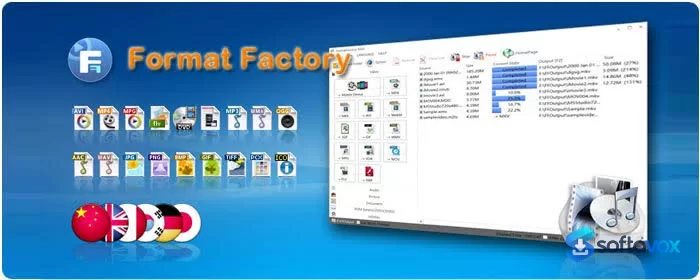
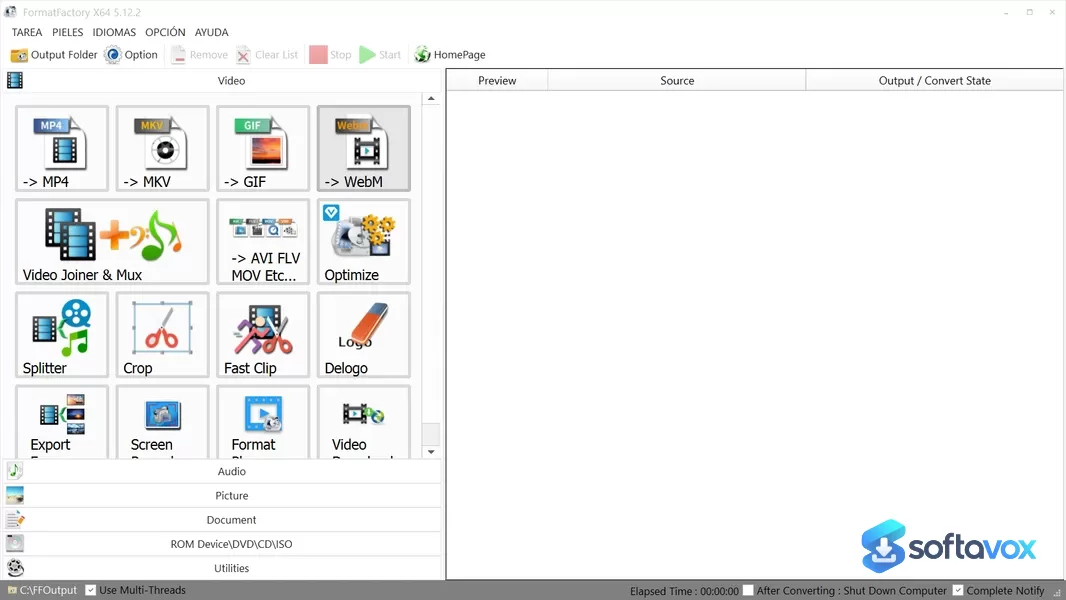
About Format Factory
FormatFactory Download, All-in-One Media Converter
TL;DR Quick Take / Who is this for?
FormatFactory is a free, Windows-only multimedia converter from Chinese developer Chen Jun Hao (pcfreetime.com) that handles video, audio, image, and even document formats in a single application. The 2026 release (version 5.22.0) remains one of the most versatile free converters available, supporting a huge range of codecs and containers, MP4, AVI, MKV, MP3, FLAC, JPG, PNG, and more, alongside built-in tools for DVD/CD ripping, video joining and splitting, and media file repair[reference:0][reference:1]. The batch processing engine is genuinely useful: you can queue dozens of files and convert them all at once without babysitting the process[reference:2]. The trade-offs are significant. The installer bundles third-party adware and offers unless you manually decline every screen, and some antivirus engines flag the installer as a potentially unwanted program (PUP) for this behaviour[reference:3][reference:4][reference:5]. The interface is dated and utilitarian, and the software is Windows-only[reference:6]. Output quality is also below dedicated tools like HandBrake, particularly for video encoding[reference:7]. FormatFactory is the right pick for budget-conscious users who need a Swiss Army knife converter for mixed media types and are prepared to navigate a cautious installation. It is not the best choice for anyone who wants a clean, ad-free installer, modern interface, or the highest-quality video output.
Quick Info Box
| License Type | Freeware (ad-supported; no paid tier) |
|---|---|
| File Size | Approx. 68–97 MB (installer varies by version and source)[reference:8][reference:9] |
| OS Compatibility | Windows 10/11 (64-bit)[reference:10] |
| Latest Version | 5.22.0 (updated August 2026)[reference:11] |
| Developer | Free Time / Chen Jun Hao (pcfreetime.com) |
Key Features & Real-World Usability
FormatFactory’s core strength is breadth. It is not the best converter at any single task, but it is the only free tool that handles video, audio, images, and documents in one interface, with a consistent workflow. Video conversion covers MP4, AVI, MKV, WMV, FLV, MOV, and many more, with output profiles for specific devices like iPhone, iPad, and Android phones[reference:12]. Audio conversion supports MP3, WMA, AAC, FLAC, OGG, and WAV, among others. Image conversion handles JPG, PNG, BMP, GIF, TIF, and ICO. The document conversion feature is unusual for a media converter: it can turn PDFs into TXT, DOC, XLS, or HTML, and extract images from PDFs[reference:13]. The built-in ripper is another practical addition. You can rip CDs to audio files and DVDs to video files, which saves you from installing a separate tool for each task[reference:14]. The repair function can salvage damaged video and audio files, and the basic editing tools let you crop, rotate, flip, and watermark media without leaving the application[reference:15][reference:16]. Batch processing is where FormatFactory shines for power users. The queue-based engine lets you load dozens of files, set individual output formats and destinations, and process them all in one go, useful for converting a season of video files or a folder of photos overnight[reference:17]. The limitations are equally clear. The interface is functional but dated, with a utilitarian layout that feels out of step with modern design conventions[reference:18]. Output quality, especially for video, is described as below what dedicated encoders like HandBrake can achieve at the same bitrate[reference:19]. The software is also Windows-only, with no native macOS or Linux version for the desktop application[reference:20].
- Universal media conversion: Convert video, audio, image, and document files in one application, covering MP4, AVI, MKV, MP3, FLAC, JPG, PNG, PDF, and many more[reference:21].
- Batch processing and queue: Load dozens of files, set individual output settings, and convert them all at once without manual intervention[reference:22][reference:23].
- Built-in DVD/CD ripping: Rip audio CDs to MP3 and video DVDs to digital files without a separate ripper[reference:24].
- Media repair and basic editing: Fix damaged video and audio files, and apply simple edits like crop, rotate, flip, and watermark[reference:25].
- Device-specific output profiles: Pre-configured presets for iPhone, iPad, Android phones, and other devices simplify conversion for playback[reference:26].
- PDF conversion and extraction: Convert PDFs to TXT, DOC, XLS, or HTML, and extract embedded images from PDF files[reference:27].
- Completely free with no time limit: No subscription, no watermark on output, and no restriction on the number of files you can convert[reference:28].
Pros, Cons & Community/User Feedback
User sentiment around FormatFactory is mixed, with praise for its versatility and speed tempered by consistent complaints about ads and installer behaviour. On Chrome Stats, the mobile app holds a 3.54 average from 1,761 ratings, with reviewers praising “easy to use with good results” and “excellent performance and fast processing,” while criticising “heavy ads and paid features” and issues locating converted files after long conversions[reference:29]. The desktop version draws similar feedback. Surftware gives it a 4.5 expert score and highlights its “extensive media format compatibility” and “powerful batch processing,” but lists “bundled third-party adware/offers during installation” and an “outdated user interface” as its main limitations[reference:30]. The most serious concerns relate to the installer. Microsoft Q&A responses confirm that the publisher “integrates unwanted software itself” to fund the free product, and that there is “no clean link” available from the official source, users must carefully decline offers during installation[reference:31]. Antivirus analyses support this: HerdProtect records the installer as a “potentially unwanted program” detected by 3 of 68 scanners, bundling the Ask.com toolbar and modifying browser search and home pages[reference:32][reference:33]. PCWelt notes that the installation “attempts to install piggyback software” and that some virus scanners consequently classify the program as potentially harmful[reference:34]. Reddit and forum sentiment is more blunt. One user on a Dutch software site reported that after an update, a War Thunder shortcut appeared on their PC alongside the installer’s “Accept” button, and concluded that “only version 3.7 is safe”[reference:35]. Another forum notes that while FormatFactory is “very easy to use,” it has “rather an unintuitive interface” and that the file browser does not appear until you select a target format[reference:36]. The practical takeaway is that FormatFactory’s conversion engine and batch tools are genuinely useful, but the installer is hostile by design, and the software’s reputation is permanently coloured by its adware bundling. Users who need a clean install should look at HandBrake for video, or FFmpeg through a GUI frontend, rather than wrestling with FormatFactory’s setup[reference:37].
Pros
- Broadest format coverage of any free converter, spanning video, audio, images, documents, and PDFs
- Powerful batch processing and queue system for converting large numbers of files
- Built-in DVD/CD ripping, media repair, and basic editing tools
- Completely free with no file limits, watermarks, or time restrictions
- Device-specific output profiles simplify conversion for phones and tablets
- Fast processing times for supported formats
- 4.5 expert score from Surftware for utility and versatility[reference:38]
Cons
- Installer bundles third-party adware and offers unless every screen is declined manually[reference:39][reference:40]
- Detected as a potentially unwanted program (PUP) by multiple antivirus engines[reference:41]
- Outdated, utilitarian interface that feels dated compared with modern converters[reference:42]
- Output quality below dedicated tools like HandBrake, particularly for video encoding[reference:43]
- Windows-only; no native macOS or Linux desktop version[reference:44]
- Some users report difficulty locating converted files after long conversions
- Mobile version is ad-heavy and paywalls basic features behind ads[reference:45]
- Bundled offers can install unwanted browser toolbars and change search settings[reference:46]
Final Verdict & Safe Download Advice
FormatFactory is a capable, genuinely useful converter wrapped in a user-hostile installer. If you need to convert a mix of video, audio, images, and documents, and you are willing to navigate a setup process designed to trick you into installing extra software, it will get the job done for free. The batch processing and DVD ripping features are particularly valuable for power users managing large media libraries, and the format coverage is unmatched at the price of nothing. But the caveats are not minor. The adware bundling is not an accident or a one-off; it is the publisher’s business model, and antivirus tools flag the installer accordingly. The interface is dated, output quality is middling, and the software is Windows-only. If you want a clean, modern converter, HandBrake is the better choice for video, and FFmpeg through a GUI frontend is the cleanest option for broad format support without ads[reference:47]. If you choose FormatFactory, download only from the official site, choose the custom installation path, and read every screen. The software itself works; the installer is the risk.
- Download only from pcfreetime.com: The official site is the only legitimate source for the installer, but it is also the source of the bundled offers. Third-party download portals often repackage the installer with additional unwanted software, so the official site, carefully navigated, is still the safest option.
- Choose the custom installation path and decline every offer: Do not use the express or recommended install. Select the custom option and deselect every pre-checked offer for browser toolbars, “optimisation” tools, or third-party software. The installer is known to bundle the Ask.com toolbar and other PUPs if you click through without reading[reference:48].
- Verify the installer size and version: The installer is approximately 68 MB according to PCWelt, though other sources report sizes up to 97 MB depending on the version and bundled components. The current version is 5.22.0. A dramatically smaller file or an older version number is a warning sign[reference:49][reference:50].
- Check system requirements before installing: FormatFactory 5.22.0 requires Windows 10 or 11 (64-bit). It will not run on older Windows versions or 32-bit systems[reference:51].
- Heed antivirus warnings: If your antivirus flags the installer as a PUP or adware, do not override the block without understanding exactly what was detected. The detection reflects the bundling behaviour, not necessarily a virus, but it is a legitimate warning about the installer’s practices[reference:52].
- Consider a cleaner alternative before committing: If you only need video conversion, HandBrake is free, open source, and ad-free. If you need broad format support without bundleware, FFmpeg through a GUI frontend like Shutter Encoder is the cleaner path. FormatFactory is the tool of last resort when you specifically need its all-in-one format coverage and can manage the installer safely[reference:53].
Similar software









Key features
- 400+ format combinations for video, audio, images, and documents
- Video: MP4, AVI, MKV, FLV, WMV, MOV, SWF, 3GP, MPG, VOB
- Audio: MP3, WAV, WMA, FLAC, AAC, OGG, M4A, MMF, AMR
- Image: JPG, PNG, BMP, GIF, WebP, TIFF, ICO with basic editing
- Document: PDF, Word, PowerPoint, Excel, HTML, Markdown, plain text
- CAJ-to-PDF, document-to-Markdown, and video-to-M3U8 (5.22.0)
- AI Engine 3.0 with DeepSeek R1 for video enhancement and repair (5.20.0)
- Hardware acceleration via NVIDIA NVENC, Intel QSV, and AMD AMF (H.264, H.265, AV1)
- CD/DVD ripping, ISO creation, screen recording, video joining, subtitle embedding, watermark removal
- Built-in basic video editor
- Free version with ads on the conversion screen
- PUP classification and Win32.Sality detections on setup files
- Alternatives: HandBrake, Shutter Encoder, XMedia Recode, FFmpeg
Frequently asked questions about Format Factory
Is Format Factory safe to download?
Is Format Factory free?
What is Format Factory used for?
Which Windows versions does Format Factory run on?
Why does hardware acceleration make my CPU hit 100 percent?
How do I uninstall Format Factory?
What’s new in Format Factory 5.22.0.0
1 Update Python to version 3.12
2 Add the module for CAJ to PDF
3 Add various document conversion to MD file format
4 Add video conversion to m3u8 format
5 Fix some issues
Versions
| Version | Release date | Platform | File size | |
|---|---|---|---|---|
| Format Factory 5.22.0.0 Latest version | Mar 11, 2026 | Windows | 162.7 MB | Download |
Comments about Format Factory
No comments yet. Share your experience with this program!